Computer Champ - mobile computer repair service - Adelaide - Call 0430 984 522
Computer Champ
  • Home
  • Bookings
  • Services
  • Pricing
  • Tips
  • Reviews
  • About
  • Contact

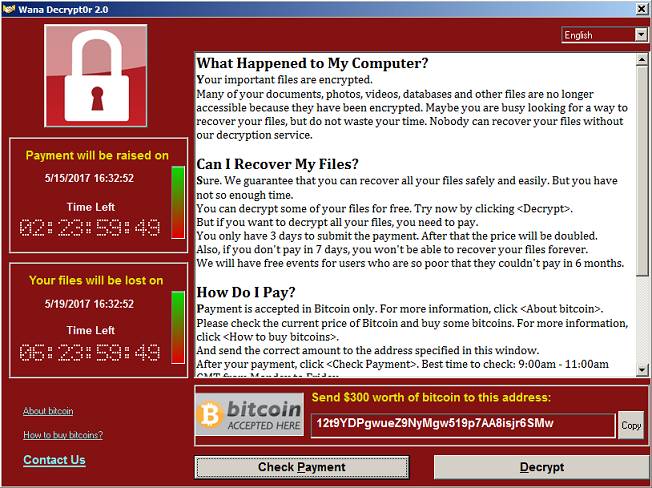
Avoid the Wana Decryptor Ransomware virus!

21/5/2017

0 Comments

 
If you've got it, then call Computer Champ on 0430 984 522 to have it removed. This virus is derived from an earlier one called CryptoLocker. Basically, make sure you're backing up your data regularly and removing your external hard drive once done. Be very careful when opening email attachments or clicking on links and watch out for people impersonating other businesses. Have a good antivirus and ensure you're getting Windows Updates. Don't give them any money, because in most cases they won't fix it for you. They'll also put you on their shortlist for future attacks.

 See the CryptoLocker here.
0 Comments

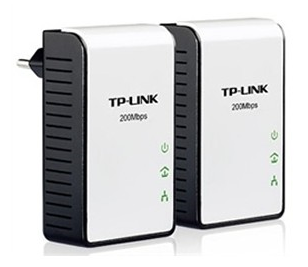
If your Wi-Fi Internet is slow, then use Powerline Adapters. Ahh, what a difference!

11/5/2017

0 Comments

 
Why use a Powerline Adapter? 
If your wireless signal is weak, then your Internet speed will be affected. It maybe weak because your router is too far away from your computer, or you may have thick walls or even interference from other wireless devices. You don't have to buy another router, USB wireless adapter or one of those wireless  boosters / extenders / repeaters. You don't need to run an Ethernet cable from one room to the other either.

How to use a Powerline Adapter
Get a Powerline Adapter. Plug one into the wall near your router and run an Ethernet cable from it to your router. Plug the other one into the wall near your computer (at the other end of the house) and run an Ethernet cable from it to your computer. That's it! 

Benefits
A customer here in Adelaide was getting an Internet speed of 10Mbps (Not much I know, but hey, it's Adelaide and it was an ADSL connection, not cable or NBN) on her computer, which was connected to her modem/router with an Ethernet cable. Anyway her husband's computer down the hall, which was connected to their wireless network, was only getting around 1.5Mbps. After connecting the Powerline Adapters, his speed went up to 9Mbps. There is no way that he would have got that speed improvement by setting up a Wi-Fi Extender. Also he no longer experience wireless drop outs. I rest my case.

Extra notes
  • Powerline Adapters basically turn the electrical wiring of a home into network cables for a computer network.
  • The Powerline Adapters work best if they're plugged directly into the wall's power socket, not into a powerboard. If you must use a powerboard, plug it in next to the cord and never into a powerboard which is plugged into another powerboard.
  • If your Internet is slow when you connect your computer to the modem/router with an Ethernet cable, then the Powerline Adapter wont make any improvement.
  • Powerline Adapters wont work if they're not plugged into the same electrical circuit within the house.
  • Instead of connecting a Powerline Adapter into your computer, you could connect it to a wireless router/access point. Then have the laptops/iPads etc connected to that router, instead of your main one. It would be much faster than using a Wi-Fi Extender.

Call Computer Champ to supply and install your Powerline Adapters now, on 0430 984 522.
0 Comments

Basic tip - how to resize multiple pics for an email

4/5/2017

0 Comments

 
Email help - fix PC
Do this when you want to email lots of pictures:
  1. Select the pictures (hold down the Ctrl key while clicking on more than one).
  2. Right click on the selected pictures > Send to > Mail recipient.
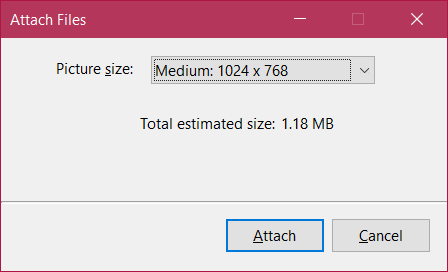
  3. In the window that opens (pictured above), select a picture size, then click on Attach.
  4. Your email program (Eg Outlook) will open a new message with the resized pictures attached. Just finish your email and send it. That's it.

So yes, you need an email program, because Web Mail just wont do in this case. The good thing about this is that you don't need to open a picture editing program and resize them one by one. Also the above method keeps your original pictures in their original high quality size. It just resizes copies for the email message only. Yes, I know most people know this, but some don't! Now they do! Welcome to Windows, people.
0 Comments

    Author

    Darrin Stainer - computer technician and business owner.

    Archives

    May 2022
    November 2019
    October 2019
    June 2019
    February 2019
    December 2018
    October 2018
    August 2018
    September 2017
    August 2017
    July 2017
    June 2017
    May 2017
    April 2017
    March 2017
    May 2016
    July 2015

Computer Champ

Computer repair service
Servicing homes in the southern and western suburbs of Adelaide.

​Call: 0430 984 522

​We come to you!

Hours

Sunday              Closed
Monday             9am-5pm
Tuesday             9am-5pm
Wednesday       9am-5pm
Thursday           9am-5pm
Friday                 9am-5pm
Saturday            Closed
Computer Champ located in Christies Beach
© COPYRIGHT 2020. ALL RIGHTS RESERVED.